Windows Can't OpenWordStar Files.This Converts Them.
Convert WordStar .WS documents to Word, PDF, and more on your PC—100% local, no uploads.Convert classic WordStar .WS, .WSD, and .WS3–.WS8 documents to DOCX, PDF, RTF, ODT, HTML, Markdown, and TXT on your PC—100% local, no uploads. A native parser recovers print controls, wrap flags, and 5.0+ sequences that generic office filters drop.
Free Windows trial on PC · 10 files · one-time licenseFree trial · 10 files · Standard from $39.95, one-time.

Don't Upload Confidential Documents to Free Cloud Converters
WordStar archives are usually old business records: signed contracts, litigation files, board minutes, personnel matters, and patient or client correspondence.
The Risk
Online converters turn reading an old document into an untracked third-party data transfer — no retention terms, no processing location, no audit trail.
The Scale Problem
Uploading one file at a time does not work for a departmental archive of thousands of .WS documents spread across nested folders.
The Application Gap
WordStar is long discontinued, Word has never had a .WS import filter, and LibreOffice has no WordStar filter at all — so nothing on a modern PC opens these files.
Popular WordStar conversions
Jump straight to a step-by-step guide for the output format you need.
Open .WS files
Can’t open a .WS file on Windows? Here’s the reliable fix.
WS → Word
Turn WordStar documents into fully editable DOCX.
WS → PDF
Produce fixed, citable PDFs for archives and disclosure.
WS → RTF
Maximum compatibility for DMS and review platforms.
WS → ODT
OpenDocument for LibreOffice and ODF retention policies.
WS → HTML
Publish decades of documents to your intranet.
WS → Markdown
Docs-as-code pipelines and AI retrieval indexes.
WS → TXT
Make the whole archive searchable in one pass.
You converted the archive. Now search it.
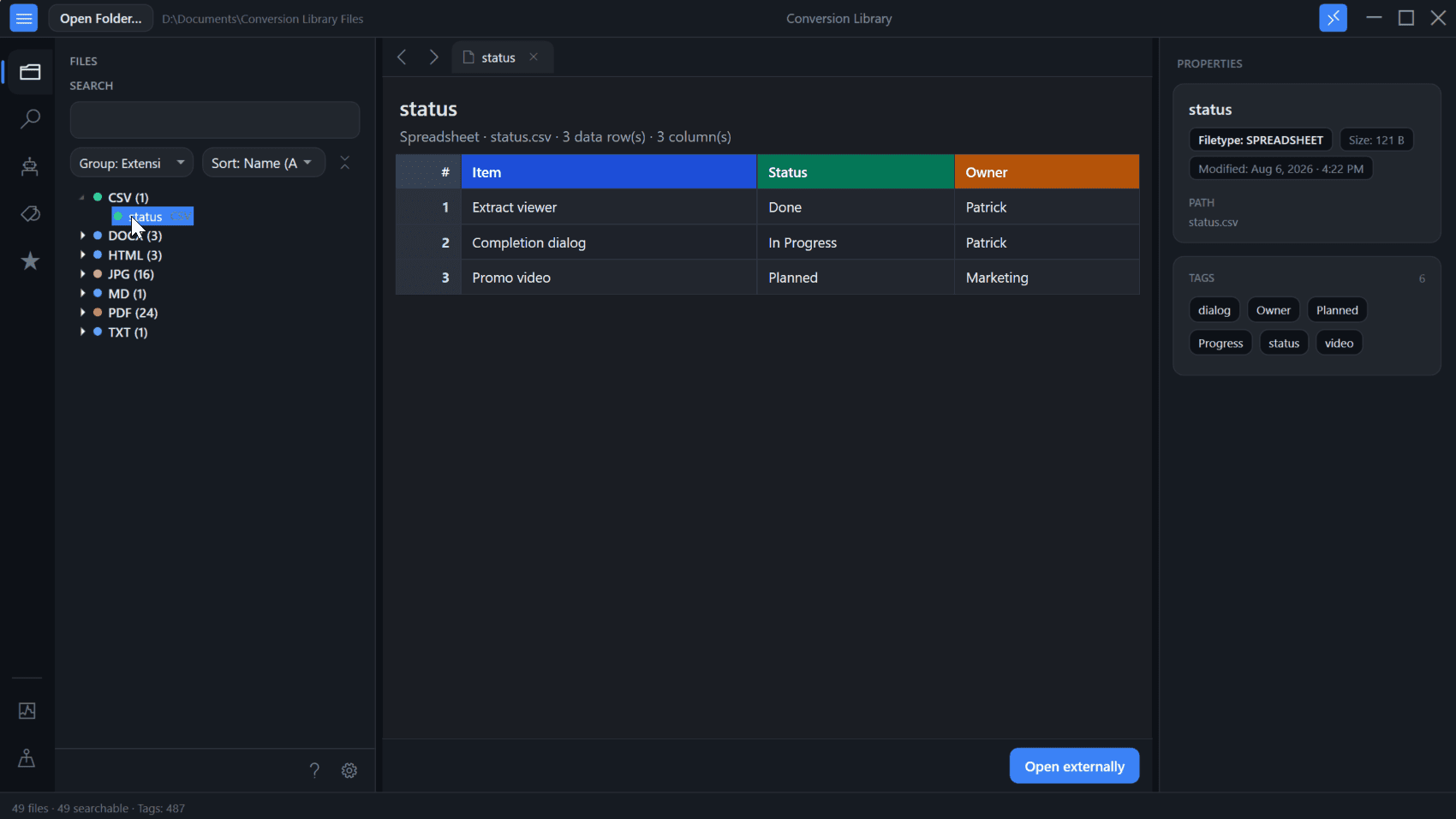
Standard converts WordStar documents locally on this PC. Plus unlocks Conversion Library — a private library of the documents you converted. Search DOCX, PDF, Markdown, HTML, RTF, and TXT. Add tags and knowledge maps. Open previews. Same installer. Unlock with a Plus key. Nothing is uploaded.
- Full-text search across converted DOCX, PDF, Markdown, HTML, RTF, and TXT on this PC
- Tags and knowledge maps for related WordStar documents
- Built-in previews — Word, PDF, and more
Plus add-on $29.95 if you already have Standard. Standard + Plus from the start is $69.90.
Professional WordStar Recovery, Total Data Sovereignty
Built for legal, government, engineering, academic, and IT teams who can't compromise on confidentiality or fidelity
Wrap, print controls, and dot commands survive.
High-bit wrap flags become real line breaks. Bold and underline print controls become formatting. Page-length and header dot commands become layout. How the format actually works
Windows Explorer Quick Convert
Right-click a .WS file or folder in Windows Explorer and launch a focused quick-convert workflow without opening the full app first — ideal for one-off recoveries and help-desk migration tasks.
Watch Folders
Point the app at a migration drop zone and any new .WS file that lands there is converted automatically — perfect for staged retirement of an old file server or department share.
100% Local Processing
WordStar Converter works where your WordStar documents already are. Files stay on your machine, behind your firewall — suitable for legal privilege, GDPR, HIPAA, and contractual confidentiality obligations that prohibit cloud uploads. It runs on air-gapped PCs too.
Native .WS Parser
Reads the WordStar format directly, from the [ver] header on down — no WordStar install, no import filter, and no dependency on LibreOffice, which has never shipped an WordStar filter at all. Uppercase .WS and SZDD-compressed files are handled too.
True Bulk Automation
Don't just convert files; convert archives. Point WordStar Converter at entire folder trees and it recursively scans your directories, processing thousands of WordStar documents in minutes rather than days.
Folder Structure Preservation
Choose how your converted output is organized. Mirror the original archive's department, year, or business-unit folder hierarchy in a new location, or write converted files directly alongside the originals.
Multi-Format Output
Tick DOCX, PDF, and Markdown and convert to all three in a single pass — no need to run the converter once per format. Parse your archive once, get every output your downstream teams need.
AI-Enabling Output
Export to Markdown and plain text for RAG, LLMs, and enterprise search. Real heading structure and LaTeX equations beat PDF extraction noise — WordStar Converter turns a decades-old WordStar archive into AI-ready content without sending data to the cloud.
No WordStar Needed
Don't rebuild a Windows 98 virtual machine just to read old documents. WordStar Converter is fully standalone — no WordStar or Lotus Word Pro required, no Office add-ins, no third-party runtimes. It handles WordStar 1.2, 2.x, and 3.x, including OS/2 and DOS-era files. Install and convert.
Supported formats
Convert WordStar documents — including uppercase .WS, .WSD, and .WS3–.WS8 files — into modern formats for editing, archiving, publishing, and AI preparation. High-bit wrap and print controls are interpreted, not dumped as garbage.
Inputs
.ws, .wsd, .ws3, .ws4, .ws5, .ws6, .ws7, .ws8
Outputs
DOCX, PDF, RTF, ODT, HTML, Markdown, TXT
Industry solutions
WordStar was strongest where documents matter most — and those are the organisations still holding .WS archives decades later.
Vote on the WordStar Converter roadmap
The public roadmap uses the same feature options managed in the admin dashboard, so visitor votes and admin priorities stay aligned.
Dot-command mapping report
Show how WordStar print controls and dot commands (.pl, .he, .fo, margins) were mapped so migration leads can review layout before sign-off.
Archive ZIP batch input
Drop a ZIP of WordStar documents into the app and convert the extracted .ws / .wsd / .ws3–.ws8 files into a mirrored output folder.
Conversion QA sampling report
Generate a review checklist that samples converted files by extension, folder, and result status for migration sign-off.
Markdown front-matter presets
Emit configurable YAML front matter with title, date, and source path when converting to Markdown for docs and RAG pipelines.
Command-line batch runner
Run repeatable WordStar conversion jobs from scripts for IT teams, records departments, and locked-down migration workstations.
Need to convert more than WordStar files?
Old archives are rarely just one format. Legacy File Converter is the universal app from the same team — it opens and converts documents, spreadsheets, presentations, and images across 100+ legacy and modern formats, entirely offline on your PC.
Convert anything to
100% offline · no uploads · batch-convert whole folders at once.
Simple, Transparent Pricing
One-time purchase. No subscriptions. No hidden fees.
Products are Standard and Plus. Licensed for personal or commercial use.
Start with the full-feature trial — convert up to 10 WordStar documents locally.
Free Windows trial on PC · 10 files · choose a license below
Step 1
Who is this for?
Step 2
Choose Standard or Standard + Plus
Products are Standard and Plus — licensed for personal use.
Standard
one-time · personal use
- Unlimited WordStar conversions
- DOCX, PDF, RTF, ODT, HTML, Markdown, TXT
- Bulk & folder processing
- Watch folders & Explorer quick convert
- 1 year of free updates
- 30-day money-back guarantee
Want search and document previews? Plus is an add-on ($29.95).
Standard + Plus
one-time · personal · two licenses
- Standard (unlimited WordStar conversions)$39.95
- Plus (Conversion Library)$29.95
- Search, tags, knowledge maps, and local previews
Already have Standard? Add Plus ($29.95)
More than WordStar files?
Legacy File Converter · from $79.95
WordStar files are rarely alone. Legacy File Converter covers WordPerfect, Lotus, Works, images, and 100+ legacy formats — fully offline on your PC.